 BoxDiegen
· Frame Tray
BoxDiegen
· Frame Tray
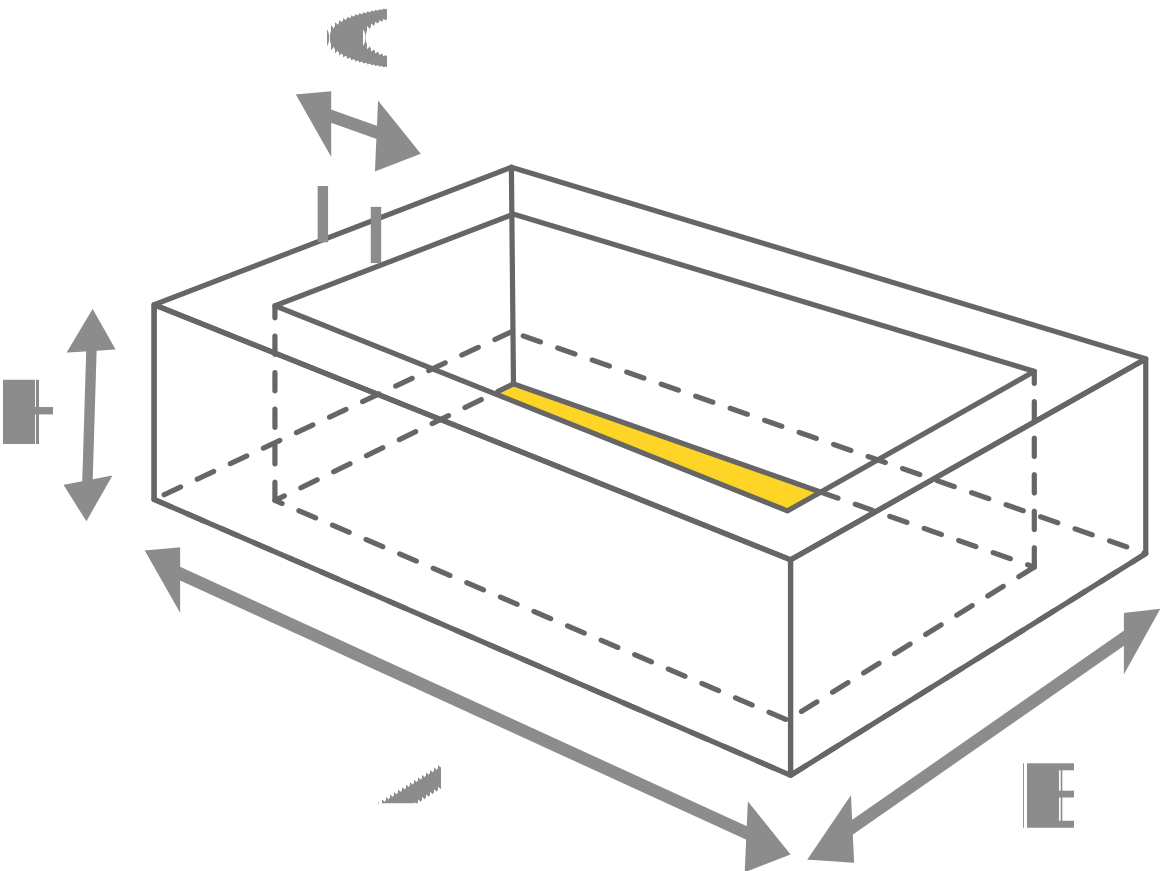
The Frame Tray visually enhance the product and highlight the high quality of the product and protects the packaged product with its double walls. As a bottom, together with the Simple Tray, it creates an exclusive, yet inexpensive packaging.
The frame tray is the premium cousin of the simple tray: its walls fold into a hollow double-wall frame that looks rigid, deep and expensive. This generator creates the frame tray dieline in your exact size and exports it free as PDF and SVG.
A frame tray is a shallow box whose walls are built from two layers of board. Each wall folds over on itself to form a hollow frame section, so the finished tray has thick, straight edges like a rigid box, even though it starts as one flat sheet. The corners are finished with a radius, which gives the tray its smooth, presentation quality look.
Brands use frame trays as the base of premium two-piece packaging, often paired with a simple tray as the lid. The deep frame lifts the product, protects it with double walls on every side, and presents it like a picture in a frame when the lid comes off. Cosmetics sets, perfumes, confectionery, jewellery and corporate gifts are classic uses, anywhere the unboxing moment is part of the product.
Frame trays are sized by base length, base width and frame height. These popular sizes cover most presentation sets.
| Size (W × D × H) | Typical use |
|---|---|
| 150 × 100 × 35 mm (5.9 × 3.9 × 1.4 in) | Jewellery and small gift sets |
| 180 × 120 × 40 mm (7.1 × 4.7 × 1.6 in) | Perfume and cosmetics sets |
| 210 × 150 × 40 mm (8.3 × 5.9 × 1.6 in) | Confectionery and gift boxes |
| 240 × 170 × 45 mm (9.4 × 6.7 × 1.8 in) | Premium electronics and watches |
| 300 × 210 × 50 mm (11.8 × 8.3 × 2 in) | Corporate hampers and presentation sets |
A frame tray is a showpiece, so print quality matters. Choose a smooth paperboard that folds without cracking, and score every fold line before folding, because the double walls must crease sharply to sit flat. Thicker boards give a more rigid frame, but very thick board can fight the tight frame folds, so test your chosen material first.
In the export, red is the cut line, green dashed is a fold and blue dotted is a perforation. Print at 100 percent scale and build one tray completely before cutting a batch. If you pair the frame tray with a simple tray lid, generate the lid slightly larger, by roughly 2 to 4 mm plus twice the material thickness on each side, and test the fit.
What is the difference between a frame tray and a simple tray?
A simple tray has single folded walls held by corner flaps. A frame tray folds each wall over into a hollow double-wall frame, so it looks thicker, feels rigid like a rigid box, and presents the product at a higher level. The frame tray uses more board and takes a little longer to fold.
Can I pair a frame tray with a lid?
Yes. The most common pairing is a frame tray base with a simple tray as the lid, which you can generate on the Simple Tray page. Make the lid slightly larger than the base and test the fit with your real board.
Is the frame tray generator free?
Yes, completely free, with no signup and no limit on downloads. Export as PDF for print or SVG for artwork and editing.
What do the C edge and R radius settings do?
The C setting is the width of the folded frame edge, which changes how chunky the frame looks. The R setting is the radius of the rounded corners where the frame turns. Larger values give a softer, more rounded frame.
Which board works best for a frame tray?
A smooth, sturdy paperboard in the 300 to 350 gsm range folds cleanly and holds the frame shape. Match the material thickness setting to the board you choose so the double walls meet correctly.
Can I use this dieline for commercial packaging?
Yes, for your own products and client work, including commercial runs. Build and finish one complete tray first to check the frame folds and the fit of any lid.
Simple Tray · Tuck End Box · Cake Box Auto Bottom · Mailer Box